Emergency Mode
Because the road doesn't always go to plan.

Most of the time, vanlife is everything you hoped it would be. The freedom, the places, the simplicity, the sky at night far from any town. Most of the time.
And then there are the other times.
The times nobody photographs. The breakdown on an unmarked track forty kilometres from the nearest town, in the dark, in the rain. The medical episode that comes from nowhere. The moment you realise you haven't told anyone where you are, and your phone signal is showing one bar and dropping. The slow, creeping recognition that you are genuinely on your own, and that the next decision matters.
These moments happen. Not often. But they happen — to experienced travellers, in familiar countries, on routes they've driven before. The freedom that makes vanlife extraordinary is inseparable from the vulnerability that makes it occasionally frightening.
Vanlife Assistant's Emergency Mode was built for those moments. Not to prevent them — nothing can do that. But to make sure that when they come, you are not as alone as you feel.
What Emergency Mode Does
You've come off a remote track in the dark. The van is stuck and you've twisted your ankle badly getting out to look. You're not sure how serious it is. You open the app and activate Emergency Mode. Everything you need is in front of you.
Because in a genuine emergency, thinking clearly is exactly what you cannot guarantee.
One button. Everything that matters.
Emergency Mode is a single, deliberately simple interface that activates everything you might need in a crisis — without requiring you to navigate menus, remember where things are, or think clearly under pressure.
Always one tap away.
Activate it from anywhere in the app. From the dashboard. From the Van tab. From the Trips screen. Designed to be usable under stress, in poor light, with shaking hands. Clear, uncluttered, showing only what matters.
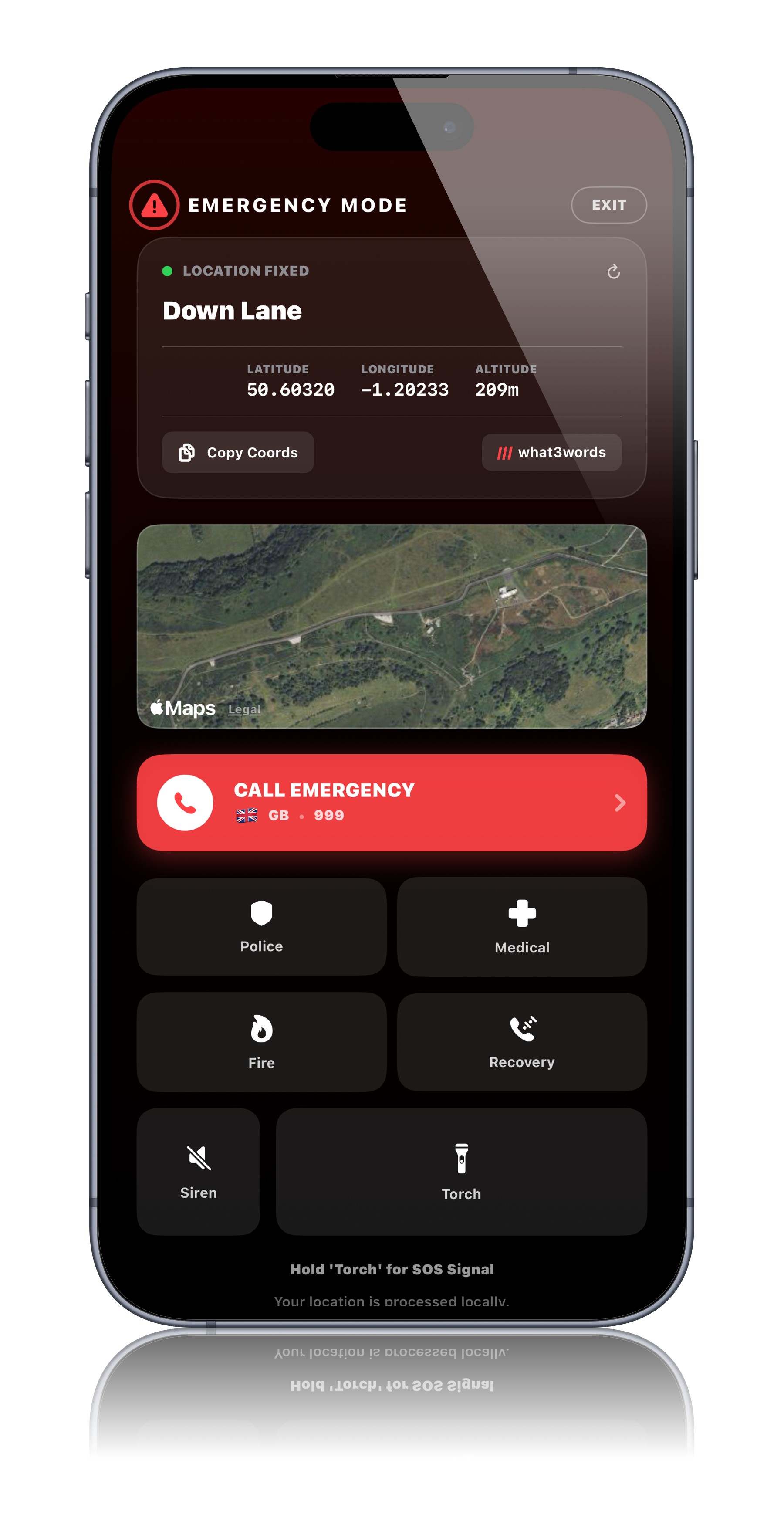
Your Location, Always Known
The most important thing in any emergency is knowing where you are.
Emergency Mode displays your current coordinates clearly and precisely — latitude and longitude, plus a readable location description. Copy them with a single tap, ready to read to an emergency dispatcher or send to someone who can help.
You need to tell someone where you are. You don't know the road name. You don't know the nearest village. But you have coordinates — precise, accurate, copyable in a single tap. You read them out. Help knows where to come.
- Precise GPS coordinates displayed prominently
- Single tap to copy for sharing
- Readable location description alongside coordinates
- Works offline — your location doesn't require signal to display
- Updates continuously as your position changes
Emergency Contacts
The people who need to know.
Emergency Mode gives you immediate access to your pre-configured emergency contacts — the people who should know if something has gone wrong. One tap to call. One tap to send your location. No searching through your phone's contacts under pressure.
Your partner is back in the UK. Your emergency contact list has their number at the top. One tap. It's ringing. You're not alone anymore.
- Pre-configure emergency contacts during setup
- One-tap calling directly from Emergency Mode
- Send your current location to any contact instantly
- Multiple contacts supported — family, travel companions, roadside assistance
- Contacts stored on-device — accessible without signal
Critical Vehicle Information
What the rescue services will need to know.
When help arrives — whether that's a breakdown service, a local mechanic, or the emergency services — they will need information about your vehicle. Emergency Mode surfaces all of it immediately, drawn from your van profile.
The breakdown service asks for your vehicle registration and gross weight. You don't have to remember. It's on the screen in front of you.
- Vehicle registration, make, and model displayed immediately
- Dimensions and gross vehicle weight for recovery services
- Insurance details accessible from the Glovebox within Emergency Mode
- Everything a rescue service needs, in one place
Critical Documents
Your most important documents, one tap away.
In an emergency you may need your insurance certificate, your vehicle registration document, your passport, or your European Health Insurance Card. Emergency Mode provides direct access to your Glovebox without requiring you to navigate away or remember where things are filed.
You've been in a minor collision. The other driver wants your insurance details. The local police want your passport. Both are in the Glovebox, accessible directly from Emergency Mode, without unlocking anything separately.
- Direct Glovebox access from within Emergency Mode
- Insurance, registration, passport, and EHIC accessible in seconds
- Documents stored offline — available without signal
Offline First, Always
Signal is a luxury. Emergency Mode is not.
The places where emergencies are most likely to happen are often the places with the worst signal. Remote tracks, mountain passes, deep valleys, coastal cliffs. Emergency Mode is designed around the assumption that you may have no signal at all.
Every feature in Emergency Mode that can work offline, does. Your location, your contacts, your vehicle information, your documents — none of them require a connection. If signal is available, additional features activate. If it isn't, everything that matters still works.
You have no signal. Emergency Mode still shows your coordinates. Your emergency contacts are still one tap away. Your documents are still accessible. The absence of signal is not the absence of help.
Setting Up Emergency Mode
Five minutes now. Peace of mind always.
Emergency Mode is only as useful as the information you put into it. Setting it up takes five minutes during onboarding — your emergency contacts, your van profile, your key documents. Once it's done, it's done. You don't think about it again until you need it.
And when you need it, it will be ready.
- Guided setup during onboarding
- Add emergency contacts, vehicle details, and key documents once
- Update at any time as your circumstances change
- Quietly present in the background of every journey you take
Emergency Mode is a tool to help you manage a difficult situation. It is not a substitute for contacting the emergency services. In a life-threatening emergency, always call the local emergency number first.
In the UK: 999 | Across Europe: 112
112 works on any network, even with no signal in many cases, and even without a SIM card.
For full detail on setting up Emergency Mode, visit the Help Desk.
Ready to hit the road?
Be among the first to experience the most complete toolkit ever built for life on the road.